

최치선
@quadr@hollo.redfeel.net · Reply to Woojin Kim's post
@me 배터리 마진을 두고 실제 20%-80% 구간만 사용하는데 5분되면 칼같이 전원 차단했다가, 비상시에는 폭주라는 이름으로 추가가동하는게 아닐지 [?]
@quadr@hollo.redfeel.net · Reply to Woojin Kim's post
@me 배터리 마진을 두고 실제 20%-80% 구간만 사용하는데 5분되면 칼같이 전원 차단했다가, 비상시에는 폭주라는 이름으로 추가가동하는게 아닐지 [?]


@hongminhee@hollo.social · Reply to 洪 民憙 (Hong Minhee) :nonbinary:'s post
chardetのMITへの再ライセンスをめぐって、RedisのantirezとFlaskのArmin Ronacher(通称 mitsuhiko)がそれを擁護する文章を書いていたので、自分なりの反論を書いてみました。
https://writings.hongminhee.org/2026/03/legal-vs-legitimate/index.ja.html
@quadr@hollo.redfeel.net · Reply to notJoon's post
@joonnot 오... 어떻게 동작하는 방식인가요.
@quadr@hollo.redfeel.net
매년 연말은 일본에서 보냈는데, 회사에 출근해 있으니 연말이 실감되지 않는다 ㅎㅎ

@nebuleto@hackers.pub
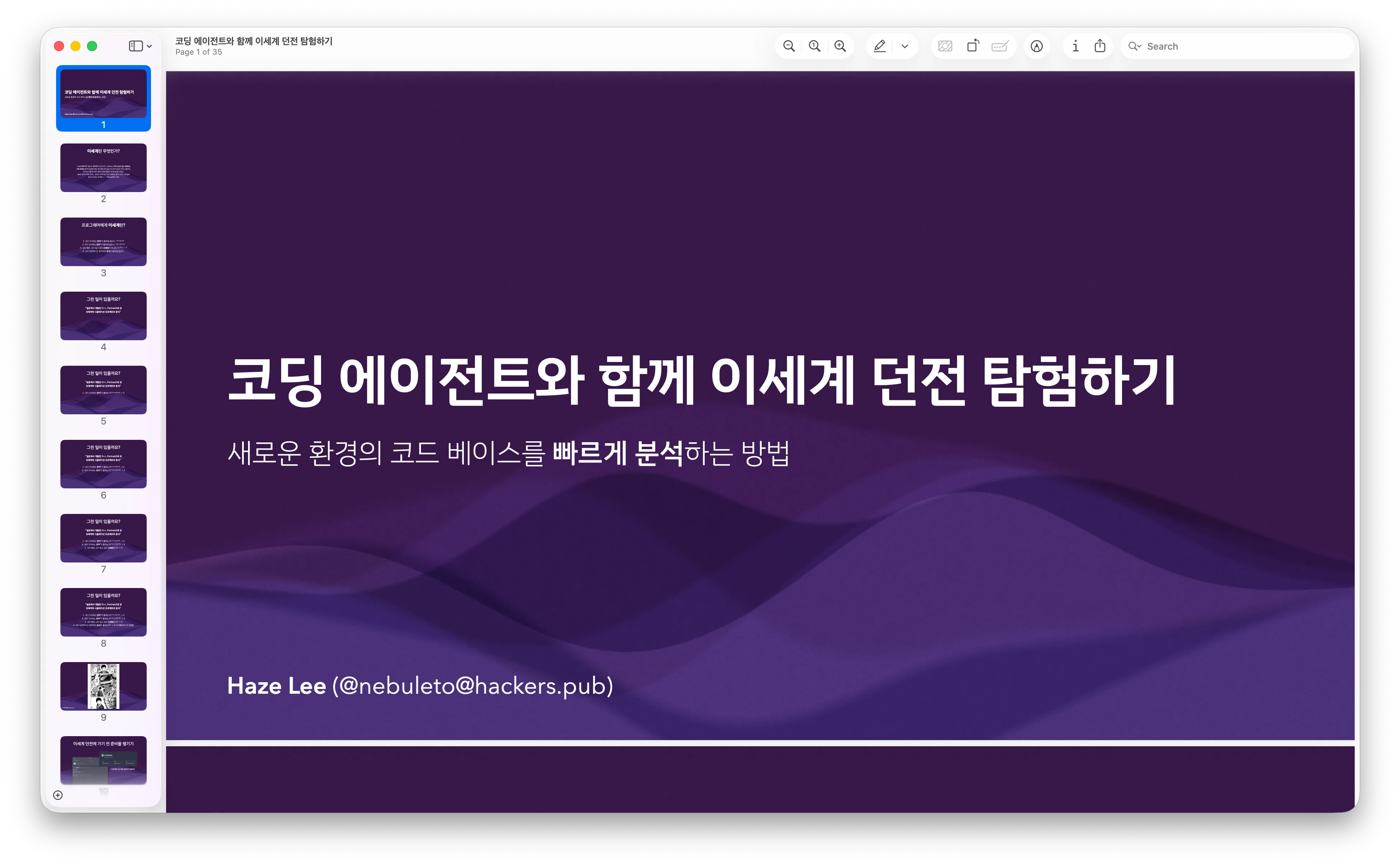
오늘 Hackers' Public @ Seoul 송년회에서 이야기한 "코딩 에이전트와 함께 이세계 던전 탐험하기: 새로운 환경의 코드 베이스를 빠르게 분석하는 방법"의 발표 슬라이드는 [다음 링크]에서 다운로드 받으실 수 있습니다! :)

@2chanhaeng@hackers.pub
제 지인 분이 GitHub 에서 인종차별적 코멘트를 받으셨습니다. GitHub 계정이 있으시면 신고 부탁드립니다. 영어가 어려우시더라도 LLM으로 신고글 써달라고 하면 잘 써줍니다. 신고는 단 시간 내에 많이 찍혀야 실제 보고로 올라가기 때문에 가능하신 분들은 꼭 신고 부탁드립니다.
RE: https://hollo.social/@hongminhee/019b413a-39c9-7975-852f-025c81eadc8d
@hongminhee@hollo.social
Just had someone leave feedback on my F/OSS project saying “maybe that's fine if a product is focused on your Chinese community.”
I'm Korean. Every single piece of documentation is in English. There's nothing in Chinese anywhere in the project.
This kind of microaggression is exhausting. As a non-white maintainer, you deal with these assumptions constantly—people who feel entitled to your labor while casually othering you based on your name.
It chips away at your motivation. It makes you wonder why you bother.
https://github.com/dahlia/optique/issues/59#issuecomment-3678606022
@quadr@hollo.redfeel.net · Reply to notJoon's post
@joonnot 오 새장비는 무엇인가요.
@quadr@hollo.redfeel.net
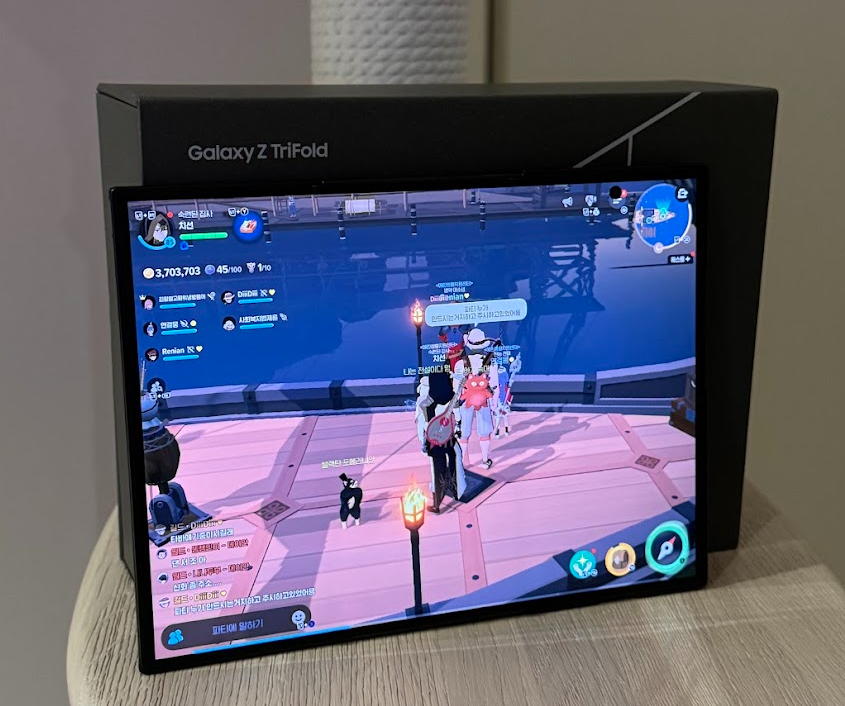
Galaxy Z TriFold 사용 후기
접고 펼치는게 처음엔 뻑뻑하고 불편했으나 적응이 되어감. 접을때 안쪽 화면을 살짝 눌러야 잘 접히는데 손톱이 찍히지 않게 신경써야 함.
내부 해상도를 보니 정말 베타버전이라는게 확 느껴짐. 내부해상도 기준 Z Fold7: 2184 x 1968 Z TriFiold: 2160 x 1584 Z Fold7 보다 화면이 커졌지만 해상도는 줄어듬. 배터리, SoC 성능, 가격등의 문제가 있었을것으로 예상. 이것보다 작은 Lenovo Y700 3세대만 해도 2560 x 1600이라 눈으로만 봐도 차이가 너무큼. 이러한 해상도 문제로인해 접었을때의 외부스크린은 글자가 너무 작고, 내부 스크린은 너무 큰 현상이 발생.
무게는 접었을땐 폰치고는 무겁게 느껴지고, 펼쳤을땐 타블렛보다 훨씬 가벼운 느낌이라 신기했음.
펼쳐서 쓸땐 베젤이 너무 없다보니 그립이 미묘해지는 상황들이 많이 발생. 스탠드형 거치대나 키보드 거치대가 꽤나 필요했음.
배터리는 기존 z flip 5보단 오래가고 막 부족한 느낌은 없음.
@hongminhee@hollo.social
CLIパーサーの新しい記事を書きました。--reporterの値によって--output-fileが必須になったり禁止になったり…そういう関係、型で表現できたら楽じゃないですか?
@hongminhee@hollo.social · Reply to 洪 民憙 (Hong Minhee) :nonbinary:'s post
오늘 liftIO 2025에서 發表한 〈Optique: TypeScript의 타입 推論으로 CLI 有效性 檢査를 代替하기〉의 發表 資料를 共有합니다! 들어주신 모든 분들께 感謝 드립니다.
@quadr@hollo.redfeel.net
내년 한해는 내가 하고싶었던 일들과 공부를 좀 더 많이해봐야겠다.
@hongminhee@hollo.social
올해를 마무리하는 블로그 글을 쓰고 있는데, 올해 뭔가 한 게 많긴 하구나…

@TypeScript@fosstodon.org
We've got some updates on TypeScript 7! The new native port
- can type-check any project
- supports --build and --incremental
- has rich editor features implemented
- is still 10x faster
and is ready for you to try today!
https://devblogs.microsoft.com/typescript/progress-on-typescript-7-december-2025/

@hongminhee@hackers.pub
@hongminhee@hollo.social
A while back I mentioned the idea of “Fedify Studio”—a web-based toolkit for #ActivityPub debugging and development. I've been quietly working on shaping that idea into something more concrete.
Nothing to announce yet, but it's looking like this might become a team effort rather than a solo project, which would be nice. We'll see how it goes.
@hongminhee@hollo.social
Thinking about building “#Fedify Studio” (tentative name)—a web-based #ActivityPub debugging & development toolkit, like a supercharged version of ActivityPub.Academy and fedify inbox command. Imagine having a proper UI for testing activities, inspecting actors, debugging federation issues… Would this be useful for other ActivityPub developers out there?

@kodingwarrior@hackers.pub
Hackers' Public @ Seoul 송년 네트워킹 밋업은 발표보다 대화, 형식보다 연결을 중심으로 진행됩니다. 라이트닝 토크도 지원받습니다. 만들었던 것·배운 것·고민했던 이야기를 자유롭게 얘기해보도록 해요.
많은 관심 부탁드립니다~
@quadr@hollo.redfeel.net · Reply to 최치선's post
원래 사용하던 Tooot (android)와 DAWN for mastodon(iOS) Client 호환성 패치로 이제 다시 전부 사용할 수 있게 되었습니다. :) 수정한 부분은 기여하기 위해 PR을 올려두었습니다.
@hongminhee@hackers.pub
We're thrilled to announce Optique 0.7.0, a release focused on developer experience improvements and expanding Optique's ecosystem with validation library integrations.
Optique is a type-safe, combinatorial CLI argument parser for TypeScript. Unlike traditional CLI libraries that rely on configuration objects, Optique lets you compose parsers from small, reusable functions—bringing the same functional composition patterns that make Zod powerful to CLI development. If you're new to Optique, check out Why Optique? to learn how this approach unlocks possibilities that configuration-based libraries simply can't match.
This release introduces automatic “Did you mean?” suggestions for typos, seamless integration with Zod and Valibot validation libraries, duplicate option name detection for catching configuration bugs early, and context-aware error messages that help users understand exactly what went wrong.
We've all been there: you type --verbos instead of --verbose, and the CLI responds with an unhelpful “unknown option” error. Optique 0.7.0 changes this by automatically suggesting similar options when users make typos:
const parser = object({
  verbose: option("-v", "--verbose"),
  version: option("--version"),
});

// User types: --verbos (typo)
const result = parse(parser, ["--verbos"]);
// Error: Unexpected option or argument: --verbos.
//
// Did you mean one of these?
//   --verbose
//   --version
The suggestion system uses Levenshtein distance to find similar names, suggesting up to 3 alternatives when the edit distance is within a reasonable threshold. Suggestions work automatically for both option names and subcommand names across all parser types—option(), flag(), command(), object(), or(), and longestMatch(). See the automatic suggestions documentation for more details.
You can customize how suggestions are formatted or disable them entirely through the errors option:
// Custom suggestion format for option/flag parsers
const portOption = option("--port", integer(), {
  errors: {
    noMatch: (invalidOption, suggestions) =>
      suggestions.length > 0
        ? message`Unknown option ${invalidOption}. Try: ${values(suggestions)}`
        : message`Unknown option ${invalidOption}.`
  }
});

// Custom suggestion format for combinators
const config = object({
  host: option("--host", string()),
  port: option("--port", integer())
}, {
  errors: {
    suggestions: (suggestions) =>
      suggestions.length > 0
        ? message`Available options: ${values(suggestions)}`
        : []
  }
});Two new packages join the Optique family, bringing powerful validation capabilities from the TypeScript ecosystem to your CLI parsers.
The new @optique/zod package lets you use Zod schemas directly as value parsers:
import { option, object } from "@optique/core";
import { zod } from "@optique/zod";
import { z } from "zod";

const parser = object({
  email: option("--email", zod(z.string().email())),
  port: option("--port", zod(z.coerce.number().int().min(1).max(65535))),
  format: option("--format", zod(z.enum(["json", "yaml", "xml"]))),
});
The package supports both Zod v3.25.0+ and v4.0.0+, with automatic error formatting that integrates seamlessly with Optique's message system. See the Zod integration guide for complete usage examples.
For those who prefer a lighter bundle, @optique/valibot integrates with Valibot—a validation library with a significantly smaller footprint (~10KB vs Zod's ~52KB):
import { option, object } from "@optique/core";
import { valibot } from "@optique/valibot";
import * as v from "valibot";

const parser = object({
  email: option("--email", valibot(v.pipe(v.string(), v.email()))),
  port: option("--port", valibot(v.pipe(
    v.string(),
    v.transform(Number),
    v.integer(),
    v.minValue(1),
    v.maxValue(65535)
  ))),
});
Both packages support custom error messages through their respective error handler options (zodError and valibotError), giving you full control over how validation failures are presented to users. See the Valibot integration guide for complete usage examples.
A common source of bugs in CLI applications is accidentally using the same option name in multiple places. Previously, this would silently cause ambiguous parsing where the first matching parser consumed the option.
Optique 0.7.0 now validates option names at parse time and fails with a clear error message when duplicates are detected:
const parser = object({
  input: option("-i", "--input", string()),
  interactive: option("-i", "--interactive"),  // Oops! -i is already used
});

// Error: Duplicate option name -i found in fields: input, interactive.
// Each option name must be unique within a parser combinator.
This validation applies to object(), tuple(), merge(), and group() combinators. The or() combinator continues to allow duplicate option names since its branches are mutually exclusive. See the duplicate detection documentation for more details.
If you have a legitimate use case for duplicate option names, you can opt out with allowDuplicates: true:
const parser = object({
  input: option("-i", "--input", string()),
  interactive: option("-i", "--interactive"),
}, { allowDuplicates: true });Error messages from combinators are now smarter about what they report. Instead of generic "No matching option or command found" messages, Optique now analyzes what the parser expects and provides specific feedback:
// When only arguments are expected
const parser1 = or(argument(string()), argument(integer()));
// Error: Missing required argument.

// When only commands are expected
const parser2 = or(command("add", addParser), command("remove", removeParser));
// Error: No matching command found.

// When both options and arguments are expected
const parser3 = object({
  port: option("--port", integer()),
  file: argument(string()),
});
// Error: No matching option or argument found.NoMatchContext For applications that need internationalization or context-specific messaging, the errors.noMatch option now accepts a function that receives a NoMatchContext object:
const parser = or(
  command("add", addParser),
  command("remove", removeParser),
  {
    errors: {
      noMatch: ({ hasOptions, hasCommands, hasArguments }) => {
        if (hasCommands && !hasOptions && !hasArguments) {
          return message`일치하는 명령을 찾을 수 없습니다.`;  // Korean
        }
        return message`잘못된 입력입니다.`;
      }
    }
  }
);The run() function now supports configuring whether shell completions use singular or plural naming conventions:
run(parser, {
  completion: {
    name: "plural",  // Uses "completions" and "--completions"
  }
});

// Or for singular only
run(parser, {
  completion: {
    name: "singular",  // Uses "completion" and "--completion"
  }
});
The default "both" accepts either form, maintaining backward compatibility while letting you enforce a consistent style in your CLI.
Line break handling: formatMessage() now distinguishes between soft breaks (single \n, converted to spaces) and hard breaks (double \n\n, creating paragraph separations), improving multi-line error message formatting.
New utility functions: Added extractOptionNames() and extractArgumentMetavars() to the @optique/core/usage module for programmatic access to parser metadata.
deno add --jsr @optique/core @optique/run
npm  add       @optique/core @optique/run
pnpm add       @optique/core @optique/run
yarn add       @optique/core @optique/run
bun  add       @optique/core @optique/run
For validation library integrations:
# Zod integration
deno add jsr:@optique/zod     # Deno
npm  add     @optique/zod      # npm/pnpm/yarn/bun

# Valibot integration
deno add jsr:@optique/valibot  # Deno
npm add @optique/valibot # npm/pnpm/yarn/bunThis release represents our commitment to making CLI development in TypeScript as smooth as possible. The “Did you mean?” suggestions and validation library integrations were among the most requested features, and we're excited to see how they improve your CLI applications.
For detailed documentation and examples, visit the Optique documentation. We welcome your feedback and contributions on GitHub!
@hongminhee@hollo.social
Optique 0.7.0 released!
Type-safe CLI parsing for TypeScript just got friendlier.
@hongminhee@hackers.pub
We're thrilled to announce Optique 0.7.0, a release focused on developer experience improvements and expanding Optique's ecosystem with validation library integrations.
Optique is a type-safe, combinatorial CLI argument parser for TypeScript. Unlike traditional CLI libraries that rely on configuration objects, Optique lets you compose parsers from small, reusable functions—bringing the same functional composition patterns that make Zod powerful to CLI development. If you're new to Optique, check out Why Optique? to learn how this approach unlocks possibilities that configuration-based libraries simply can't match.
This release introduces automatic “Did you mean?” suggestions for typos, seamless integration with Zod and Valibot validation libraries, duplicate option name detection for catching configuration bugs early, and context-aware error messages that help users understand exactly what went wrong.
We've all been there: you type --verbos instead of --verbose, and the CLI responds with an unhelpful “unknown option” error. Optique 0.7.0 changes this by automatically suggesting similar options when users make typos:
const parser = object({
  verbose: option("-v", "--verbose"),
  version: option("--version"),
});

// User types: --verbos (typo)
const result = parse(parser, ["--verbos"]);
// Error: Unexpected option or argument: --verbos.
//
// Did you mean one of these?
//   --verbose
//   --version
The suggestion system uses Levenshtein distance to find similar names, suggesting up to 3 alternatives when the edit distance is within a reasonable threshold. Suggestions work automatically for both option names and subcommand names across all parser types—option(), flag(), command(), object(), or(), and longestMatch(). See the automatic suggestions documentation for more details.
You can customize how suggestions are formatted or disable them entirely through the errors option:
// Custom suggestion format for option/flag parsers
const portOption = option("--port", integer(), {
  errors: {
    noMatch: (invalidOption, suggestions) =>
      suggestions.length > 0
        ? message`Unknown option ${invalidOption}. Try: ${values(suggestions)}`
        : message`Unknown option ${invalidOption}.`
  }
});

// Custom suggestion format for combinators
const config = object({
  host: option("--host", string()),
  port: option("--port", integer())
}, {
  errors: {
    suggestions: (suggestions) =>
      suggestions.length > 0
        ? message`Available options: ${values(suggestions)}`
        : []
  }
});Two new packages join the Optique family, bringing powerful validation capabilities from the TypeScript ecosystem to your CLI parsers.
The new @optique/zod package lets you use Zod schemas directly as value parsers:
import { option, object } from "@optique/core";
import { zod } from "@optique/zod";
import { z } from "zod";

const parser = object({
  email: option("--email", zod(z.string().email())),
  port: option("--port", zod(z.coerce.number().int().min(1).max(65535))),
  format: option("--format", zod(z.enum(["json", "yaml", "xml"]))),
});
The package supports both Zod v3.25.0+ and v4.0.0+, with automatic error formatting that integrates seamlessly with Optique's message system. See the Zod integration guide for complete usage examples.
For those who prefer a lighter bundle, @optique/valibot integrates with Valibot—a validation library with a significantly smaller footprint (~10KB vs Zod's ~52KB):
import { option, object } from "@optique/core";
import { valibot } from "@optique/valibot";
import * as v from "valibot";

const parser = object({
  email: option("--email", valibot(v.pipe(v.string(), v.email()))),
  port: option("--port", valibot(v.pipe(
    v.string(),
    v.transform(Number),
    v.integer(),
    v.minValue(1),
    v.maxValue(65535)
  ))),
});
Both packages support custom error messages through their respective error handler options (zodError and valibotError), giving you full control over how validation failures are presented to users. See the Valibot integration guide for complete usage examples.
A common source of bugs in CLI applications is accidentally using the same option name in multiple places. Previously, this would silently cause ambiguous parsing where the first matching parser consumed the option.
Optique 0.7.0 now validates option names at parse time and fails with a clear error message when duplicates are detected:
const parser = object({
  input: option("-i", "--input", string()),
  interactive: option("-i", "--interactive"),  // Oops! -i is already used
});

// Error: Duplicate option name -i found in fields: input, interactive.
// Each option name must be unique within a parser combinator.
This validation applies to object(), tuple(), merge(), and group() combinators. The or() combinator continues to allow duplicate option names since its branches are mutually exclusive. See the duplicate detection documentation for more details.
If you have a legitimate use case for duplicate option names, you can opt out with allowDuplicates: true:
const parser = object({
  input: option("-i", "--input", string()),
  interactive: option("-i", "--interactive"),
}, { allowDuplicates: true });Error messages from combinators are now smarter about what they report. Instead of generic "No matching option or command found" messages, Optique now analyzes what the parser expects and provides specific feedback:
// When only arguments are expected
const parser1 = or(argument(string()), argument(integer()));
// Error: Missing required argument.

// When only commands are expected
const parser2 = or(command("add", addParser), command("remove", removeParser));
// Error: No matching command found.

// When both options and arguments are expected
const parser3 = object({
  port: option("--port", integer()),
  file: argument(string()),
});
// Error: No matching option or argument found.NoMatchContext For applications that need internationalization or context-specific messaging, the errors.noMatch option now accepts a function that receives a NoMatchContext object:
const parser = or(
  command("add", addParser),
  command("remove", removeParser),
  {
    errors: {
      noMatch: ({ hasOptions, hasCommands, hasArguments }) => {
        if (hasCommands && !hasOptions && !hasArguments) {
          return message`일치하는 명령을 찾을 수 없습니다.`;  // Korean
        }
        return message`잘못된 입력입니다.`;
      }
    }
  }
);The run() function now supports configuring whether shell completions use singular or plural naming conventions:
run(parser, {
  completion: {
    name: "plural",  // Uses "completions" and "--completions"
  }
});

// Or for singular only
run(parser, {
  completion: {
    name: "singular",  // Uses "completion" and "--completion"
  }
});
The default "both" accepts either form, maintaining backward compatibility while letting you enforce a consistent style in your CLI.
Line break handling: formatMessage() now distinguishes between soft breaks (single \n, converted to spaces) and hard breaks (double \n\n, creating paragraph separations), improving multi-line error message formatting.
New utility functions: Added extractOptionNames() and extractArgumentMetavars() to the @optique/core/usage module for programmatic access to parser metadata.
deno add --jsr @optique/core @optique/run
npm  add       @optique/core @optique/run
pnpm add       @optique/core @optique/run
yarn add       @optique/core @optique/run
bun  add       @optique/core @optique/run
For validation library integrations:
# Zod integration
deno add jsr:@optique/zod     # Deno
npm  add     @optique/zod      # npm/pnpm/yarn/bun

# Valibot integration
deno add jsr:@optique/valibot  # Deno
npm add @optique/valibot # npm/pnpm/yarn/bunThis release represents our commitment to making CLI development in TypeScript as smooth as possible. The “Did you mean?” suggestions and validation library integrations were among the most requested features, and we're excited to see how they improve your CLI applications.
For detailed documentation and examples, visit the Optique documentation. We welcome your feedback and contributions on GitHub!
@quadr@hollo.redfeel.net
도메인 분실[?]로 hollo로 갈아탔습니다. 갈아타는게 쉽지 않군요. 기존에 쓰던 Android/iOS Client와의 호환성도 추가적으로 체크해봐야할것 같습니다. ㅠㅠ